teman, teman mohon bantuannya.. kenapa kalo ada orang mau komentar di postingan ga bisa.. malah ada pesan error.
masalah ini baru saya ketahui setelah mas bayumukti berkunjung dan akan berkomentar dan ternyata error.
saya dah coba kutak kutik dengan berbagi cara seperti mengembalikn thems yang lama masih tetap error..
apa mungkin karena perpindahan hosting yang tidak baik..
tolong masukannya melalui shoutmix..
sebelumnya terimakasih.. 🙂
Blog
-
tidak bisa komentar
-
Bayu Mukti, Bocah yang Bukan Bocah Lagi
Bagi orang-orang yang rajin mencari uang via internet pasti gak asing lagi dengan yang namanya Bayu Mukti..., bocah yang bukan bocah lagi.. karena sekarang mas bayu sudah kuliah.. masa masih di bilang bocah sich 🙂
Saya mengetahu keberadaan mas bayu mukti ini ketika tahun 2007 aktif di komunitas cosaaranda.com berkoment ria mencari pertamaxxx, sayang saya tak terlalu fokus karena kesibukan bekerja sedangkan mas bayu waktu itu masih bocah SMA yang sukses di duniat internet marketing sehingga sering di jadikan contoh oleh mater2 lainnya.. 🙂 keren…..
 Melalui 1 blog bayumukti.com (PR4 Man…!!!!) saja beliau bisa mendapatkan uang yang lumayan dari orang-orang yang ingin beriklan di webnya tersebut…. lihat saja web beliau itu.. gak pernah ada space kosong untuk iklan… begitu kosong langsung di pesan sama orang yang ingin beriklan… (jika 1 space harganya 200rb perbulan.. tinggal kalikan saja berapa perbulannya dngan 8 space iklan… Mantrab….)
belum lagi dengan 49 blog lainnya…. 🙂 coba bayangkan berapa penghasilan beliau perbulannya… spertinya bisa mencapai 3 Digit lho… Dolar Lagi…. Wow Keren….
 Makanya banyak yang ingin menjadi temannya dan ingin dapat ilmu dari beliau… hal ini bisa di lihat dari jumlah teman di FB beliau.
setiap beliau posting, yang replay puluhan…
termasuk saya yang ingin mendapatkan backlink dengan meninggalkan http://sariful.com di setiap akhir comment.
oleh karena itu, mari semua semangat dan semangat dalam mencari $$$ yang berterbangan di internet. jangan putus asa karena penghasilan ga naik2 seperti artikel Bagaikan langit dan bumi.
Singkatnya gini, jika kita memiliki 1 buah blog dan bisa menghasilkan $0,1 (penghasilan beliau seperti yang di katakan mas bayu….) maka bayangkan jika memiliki 50 blog…. berarti $5 per hari…
jadi mulai sekarang… Semangat dan semangat….. Lanjutkan 🙂
-
Setting Outlook Express
Ternyata teman saya masih banyak yang bingung untuk setting outlook Express dan mungkin juga teman-teman yang lain. berikut adalah cara setting email di outlook express :
1. Jalankan Program outlook Express, isikan nama sesuai keinginan anda. nama ini yang nantinya muncul di email yang diterima oleh orang yang kita kirimkan email.

2. Isi alamat email anda

3. isi pop3 dan SMTP sesuai dengan email anda (Tanyakan provider anda jika tidak mengetahuinya)

4. Isi Account Name beserta password email nya.

5. Klik Finish dan selesai

-
Anti Virus Smadav 2009 Rev. 6.4
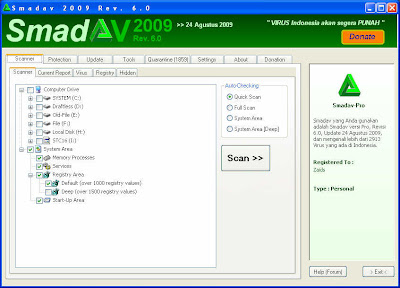
Smadav 2009 Rev. 6 akhirnya dirilis ke publik setelah disempurnakan dan dites selama sebulan lebih di lab Smadav. Revisi kali ini adalah revisi terbesar yang pernah dilakukan di Smadav. Bisa dikatakan ini adalah versi terbaik Smadav yang pernah ada. Sangat banyak penyempurnaan yang dilakukan, penyempurnaan utamanya adalah pada engine scanner, fitur karantina, proteksi registration key, penanganan error, dan masih banyak lagi. Untuk yang lebih lengkap silakan lihat di daftar paling bawah.
Pada Rev. 6 kali ini telah ditambahkan pendeteksi dan pembersih tuntas 100 virus lokal terbaru, diantaranya yang sedang banyak menyebar adalah Virus AlbumBokep, Yuyun, Deadlock, Fullhouse, dll. Mulai saat ini Smadav akan lebih akurat dalam penghapusan/pembersihan file, file document (doc atau xls) sekarang sudah dapat dibersihkan dari infeksi virus tanpa perlu mengkarantinanya. Rev. 6 menggunakan Teknik scanning dan heuristik baru yang lebih cepat dan akurat baik untuk mendeteksi virus yang sudah ada di database maupun virus varian baru.
Berikut ini adalah daftar lengkap Penyempurnaan Smadav 2009 Rev. 6 :
[General]
- Karantina jauh lebih sempurna dan ditambah fitur Enkripsi
- Penyempurnaan proteksi Registration Key untuk mencegah pembajakan
- Penambahan tombol fix all pada form minimize
- Posisi koordinat form/window Smadav akan tersimpan ketika exit
- Bug/gagal melakukan restore file karantina jika path asal file sudah digunakan file lain
- Bug/gagal melakukan explore folder jika nama folder memiliki karakter koma (,)
- Bug/crash pada beberapa keadaan saat Smadav aktif sebagai guest di Windows XP
- Tidak lagi terlalu banyak mengakses floppy
- Penyempurnaan tampilan form pada beberapa bagian
- Penyempurnaan fitur message dan exit pada form minimize
- Dapat menampilkan MessageBox Unicode (more…)
-
Intel Core I3 ready Adoption 32nm
After formally introducing I5 Core processors and Core i7 Lynnfield, Intel is now preparing for a new processor that has been using 32nm fabrication production, namely the Intel Core I3.
Intel Core i7 and Core I5 Lynnfield current fine is called the Intel processor with the most advanced technology. However, Intel no longer will be poured new processor family that has been used for 32nm manufacturing.
Intel Core Series I5 600, 500 and I3 Core Pentium Dual-core variant of others rumored to be a processor for low-end systems with the smallest production fabrication, ie, 32nm.
Although created for users with limited funds, the processor is rumored to be marketed from 2010 that still use the technology not unlike the Core i7 Lynnfield, call it High-K Metal Gate (HKMG) has.
As quoted from Techpowerup, Tuesday, the processor will be present for the PC desktop with a password Clarkdale and notebook codenamed Arrandale.
-
Mempercepat koneksi speedy dengan Setting DNS
Berikut adalah cara mempercepat koneksi internet speedy dengan setting DNS (Domain Name Server) yang sesuai area lokasi pemasangan Speedy masing-masing, meskipun pada dasarnya secara otomatis DNS pengguna Speedy telah diset pada Perangkat Network Speedy (Broadband Acess Server).
Sebagai informasi bahwa PT Telekomunikasi Indonesia, tbk memiliki sejumlah DNS yang dapat digunakan oleh pengguna Speedy adalah sebagai berikut:No DNS LOKASI IP 1 Medan 203.130.206.250 2 Batam 203.130.193.74 3 Jakarta 202.134.0.155 4 Jakarta 203.130.196.155 5 Bandung 222.124.204.34 6 Surabaya 202.134.1.10 7 Balikpapan 203.130.209.242 8 Denpasar 61.94.192.12 Seting DNS dapat dilakukan pada modem pelanggan atau pada komputer pelanggan. Pada Artikel ini yang akan dijelaskan adalah cara Setting DNS di Komputer dengan tahapan sebagai berikut:
pada pilih menu START > MyNetwork Places – Klik Kanan >Propertis

Setelah jendela network terbuka. Klik kanan pada Local Area Netwok >Propertis

Seting DNS, sesuai dengan lokasi pemasangan Speedy Anda.
Contoh misalnya lokasi Jakarta


Selamat mencoba
-
I5 and Intel Core i7 Ready Lynfiled circulated in Indonesia
The news of the birth of i5 Intel Core and Core i7 Lynfiled increasingly louder sound. It also the second processor into the conversation because of performance and the price has.
Do not worry, Indonesia computer users will not only be a spectator. Because, Intel is ready to speak up about the availability of these two new products for the Indonesian people.
Unlike the previous series, both core I5 or Core i7 Lynfiled has different specifications. Call it the support of three-channel memory controller
is eliminated, then the two processors are also present in the new socket LGA socket that is in 1156.Through the extension arms in Indonesia, Intel’s ready to go to the opening of the details of the processor that much awaited by the computer enthusiast, both for the specification offered, availability, until the price range will be in Indonesia.
-
Microsoft accused Spread Spyware
Microsoft back to a lawsuit. This time with the allegations spread software spy spyware aliases to users of Windows XP.
Malicious software, called Microsoft’s distributed by none other than the Windows Genuine Advantage (WGA). In fact, the WGA is one way Microsoft software to prevent piracy.
Allegations were contained in lawsuits filed in Washington, United States. As quoted by Electronista, Microsoft had violated privacy laws by WGA.
WGA is sending personal information of users to the Microsoft servers every day. This includes IP address and other details that could be used to track the user’s location.
In fact, these demands call, Microsoft openly says will not send personal information via WGA.
Microsoft also is not fair in spreading the WGA. Because the software is called a security update when the anti-piracy tool.
In its official statement, Microsoft refused if the WGA is already sending personal information that can identify users.
Microsoft also recognizes that the WGA update to block a particular role to users of Windows that are recognized as pirated products. This includes the Service Pack and Internet Explorer.
These demands, demanding damages of about USD 5 million from Microsoft. Two similar claims have also been submitted to Microsoft in 2006
-
Step 'Sweeps' FullHouse Virus
Another virus that threatens the computer user is FullHouse virus. The characteristics of this virus is making an extra drive with the name FullHouse Drive.
The virus is made using Visual Basic programming language that in performing its action will create a separate drive on the Desktop, My computer and Control Panel that when opened will display images “Han Ji Eun” beautiful artist in the series Full House.
To clean it, consider the following steps:
Virus-scan files that are in the directory C: RECYCLER with antiviral agents are able to detect this virus very well. Vaksincom using Norman Security Suite.
-After the scan is finished with a virus file delete the file status (defered) means the file will be deleted when windows restart
-Clean button and then click Close at the time Norman Security Suite also will ask the computer to restart
To normalize the re-registry that was created by a virus open Notepad then copy the script below:
[Version]Signature=”$Chicago$”
Provider=Vaksincom Oyee
[DefaultInstall]
AddReg=UnhookRegKey
DelReg=del
[UnhookRegKey]
HKCR, batfileshellopencommand,,,”””%1″” %*”
HKCR, comfileshellopencommand,,,”””%1″” %*”
HKCR, exefileshellopencommand,,,”””%1″” %*”
HKCR, piffileshellopencommand,,,”””%1″” %*”
HKCR, lnkfileshellopencommand,,,”””%1″” %*”
HKCR, scrfileshellopencommand,,,”””%1″” %*”
HKCU, SoftwareMicrosoftWindowsCurrentVersionExplorerAdvanced,
HKLM, SOFTWAREClassesexefileDefaultIcon,,,””%1″”
HKLM, SOFTWAREClassesexefile,,,”Application”
HKLM, SoftwareCLASSESexefileshellopencommand,,,”””%1″” %*”
HKLM, SoftwareCLASSESregfileshellopencommand,,,”regedit.exe “%1″”[del]
HKLM, SOFTWAREMicrosoftWindowsCurrentVersionpoliciesExplorerRun, Task
Manager
HKCU, SoftwareMicrosoftWindowsCurrentVersionPoliciesExplorerRun, Manager Task
HKCR, exefile, NeverShowExt
HKCR, CLSID{10020D75-0000-0000-C000-000000000000}
HKLM, SOFTWAREClassesCLSID{10020D75-0000-0000-C000-000000000000}-Save with the name “repair.inf” select Save As Type to All Files
-Run repair.inf with right click and select install
-Delete files created by the virus with the following characteristics:
* Type the file “application”
* Extension “exe”
* Size 168 kb-To facilitate the process of finding the virus files using “Search Windows”
with the filter *. exe file that has 168 KB size and date modified
dated 7/8/2008-Then delete “FullHouse Drive” on the Desktop, My Computer and Control
Panel-Recovery folder on the Flash Disk that has been in Hidden
-To show hidden folders back to the flash. Use
command “attrib” at the command prompt.* Click “Start”
* Click “Run”
* Type “CMD”, then press “Enter”-Move the directory to the drive position Flash Disk, say E then type
command E: and press “enter”-Then type attrib -s -h -r / s / d and then press
“enter”
